
sciter 表格组件例子,演示了组件之间的事件订阅和触发
By
terrorist
at 2022-05-04 • 0人收藏 • 1684人看过

import win.ui;
/*DSG{{*/
var winform = win.form(text="aardio form";right=759;bottom=469)
winform.add()
/*}}*/


import web.sciter
import web.sciter.debug

var wb = web.sciter( winform )
wb.attachEventHandler( web.sciter.debug );

wb.html = /**
<!doctype html>
<html>
<head>
   <META http-equiv="Content-Type" content="text/html; charset=utf-8">
    <script>
    	class Item extends Element{
    	   	this(props){
    	   	    this.info = props.info
    	   	}
    	    render(){
    	        return <tr>
    	        	<td>{this.info.txt}</td>
    	        	<td><button cmd="delete">删除</button></td>
    	        </tr>
    	    }


   	  		 ["on click at button[cmd=delete]"](){
 				 this.postEvent(new Event("delete", {bubbles: true, data:this.nodeIndex}));
    	    }
    	}

    	class Table extends Element{
    	    this(props){
    	        this.data = props.data
    	    }
    	    render(){
    	        return <div>
    	        	<input type="text" class="new-txt" /><button cmd="new">新建</button>
    	         	<table>
                		<thead>
                			<tr>
                				<th>content</th>
                				<th>delete button</th>
                			</tr>
                		</thead>
                		<tbody>
                    		{this.data.map( (info) => <Item info = {info}/> )}
                		</tbody>
            		</table>
    	        </div>


    	    }

    	    ["on click at button[cmd=new]"](){
    	        let txt = this.$(".new-txt").value;
    	        if(txt.length){
    	            this.data.push({txt:txt})
    	            this.componentUpdate()
    	        }
    	    }

    		["on delete"](evt){
    	    	this.data.splice(evt.data, 1)
    	    	this.componentUpdate()
    		}
    	}

    	let data = [
    		{txt:"a"},
    		{txt:"b"},
    		{txt:"c"},
    	]
    	document.body.content(<Table data={data} />)
    </script>
    <style type="text/css">
    </style>
</head>
<body>
</body>
</html>
**/

winform.show();
win.loopMessage();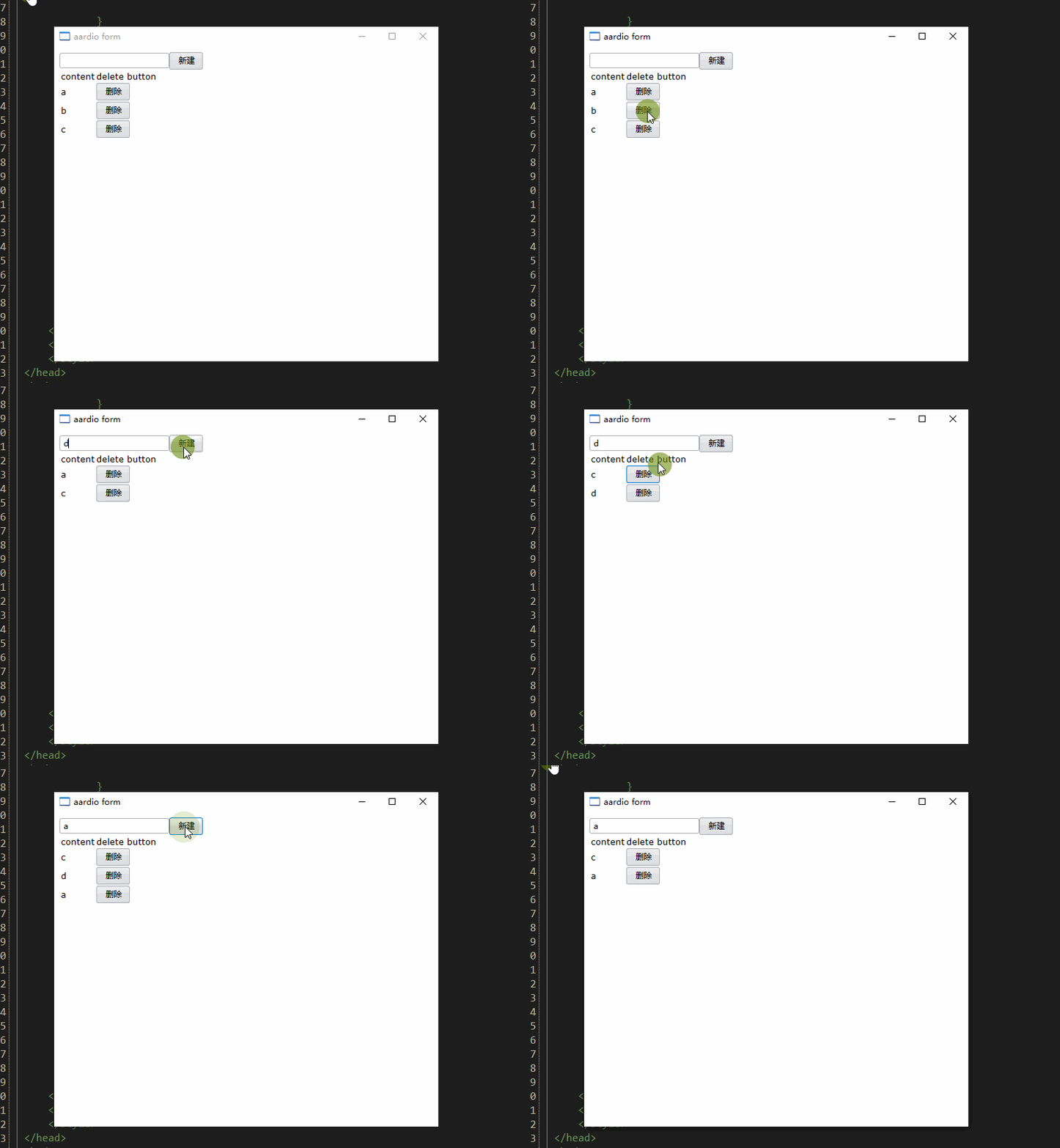
演示了
1 删除一行数据的步骤: 从数据源上删除数据, 父组件执行 componentUpdate 让子组件也就是表格重新渲染
2 子组件 >>父组件 传递事件
3 个回复 | 最后更新于 2022-05-05


登录后方可回帖
赞,
疫情期间刚好可以学学sciter,有没比较好入门的视频文章啥的推荐?